For the past couple of years, not just people in IT, but everyone with a mobile device has been captivated by the magic of AI, be it photo or video editing, voice modulation, code generation, or even answering simple search queries.
We’ve all used the simple “prompt-in, response-out” paradigm, where you type a question, and you get a text answer. It’s a powerful demonstration that still works for many in their day-to-day work. However, for those of us building real-world enterprise solutions, it has become clear that merely using LLM models for chatbots is not the AI solution we were looking for.
Why? Because businesses don’t run on conversations; they run on deterministic actions, processes, and structured data.
To generate real value, we must evolve from conversational AI to actionable AI, and this involves integrating AI agents.
“Think of a Google AI Agent as a digital assistant with a powerful brain (LLM) and all the right tools (your enterprise APIs and Data) to automate complex tasks you’d normally do yourself.”
This is where the Google Agent Development Kit (ADK) fundamentally changes the game. It’s not just another LLM wrapper or an LLM gateway. Google Agentic Framework is a sophisticated framework built to address the core challenges that prevent Conversational AI models from working effectively.
Why “Prompt-In, Response-Out” Fails the Enterprise?
The simple chat model fails for four key reasons.
1. Chat doesn’t fit everywhere: Prompt-In, Response Out is not a scalable option for the enterprise because not all enterprise applications work on a chat-based approach. Simple chat-based AI is most effective for individuals seeking Q&A, but it’s not a suitable solution for applications.
2. No Context management: Raw LLMs are stateless, unless the state is explicitly set in each conversation. Each interaction is a blank slate. They struggle to recall the user’s identity, previous discussions, or their current step in a multi-stage process, particularly when using APIs, which are the primary method most enterprises use to integrate AI into their systems.
3. No Structured Interface: LLMs output unstructured text. Your application is then left with the error-prone, unpredictable task of parsing that text to extract usable data. Trying to extract a JSON object from a paragraph of text reliably is a recipe for production failures.
4. Less Guardrails: A base LLM is unconstrained. It can hallucinate facts, ignore your company’s business rules, and cannot be forced to ground its answers in your proprietary data. You can’t trust it with mission-critical tasks.
Enter Google Agent Development Kit: Building Agents, Not Chatbots
Google ADK Agent Development Kit is Google’s open-source framework to help organizations build, orchestrate, and deploy AI agents at scale. Agent Development Kit allows you to create multi-agent systems where agents can reason, collaborate, and perform tasks using large language models.
Developers can design agents that go beyond managing conversations but also integrate with APIs, databases, cloud services, and enterprise tools to participate in real-world actions. Google ADK supports different agent types, including LLM Agents for reasoning and Workflow Agents (Parallel or Loop) for task orchestration.
With features such as session and memory management, artifact handling, and more, ADK enables agents to break down complex functionality into manageable steps.
| Recommended Read: Agentic AI Explained: The Future of Autonomous Intelligence |
Core Concept of ADK
The Google Agent Development Kit is built on a few key primitives and concepts that make it a reliable framework for agents.
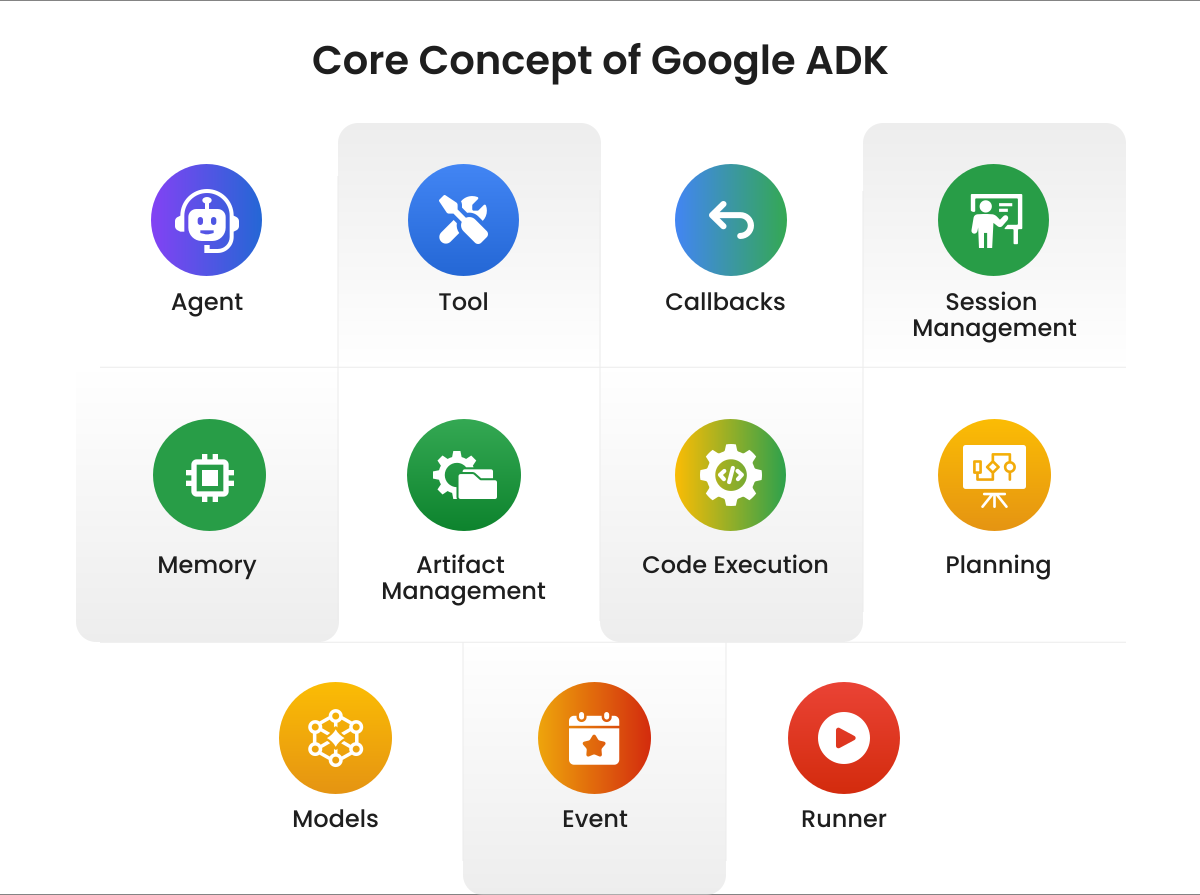
- Agent: The fundamental worker unit to perform specific tasks using LLM models for complex reasoning or workflow agents.
- Tool: The Tool enables you to extend conversations by integrating agents with external APIs, searching for information, and executing code.
- Callbacks: Custom code hooks triggered at specific points in an agent’s process, helpful in adding checks, logging, or modifying behavior.
- Session Management: Manages the flow of conversation by including its history and the agent’s working memory for the same conversation.
- Memory: Provide long-term context for a conversion by recalling information about a user across multiple sessions.
- Artifact Management: Enable agents to save, load, and manage files such as images or PDFs associated with a session or user.
- Code Execution: The ability for agents (usually via Tools) to generate and execute code to perform complex calculations or actions.
- Planning: An advanced capability that enables agents to break down complex goals into smaller steps and plan how to achieve them, similar to a ReAct planner.
- Models: The underlying LLM that powers LLM agents to enable their reasoning and language understanding abilities.
- Event: A unit to communicate within the session – user message, agent reply, or tool use.
- Runner: An execution engine that manages the flow, orchestrates agent interactions based on Events, and coordinates with backend services.
Key Capabilities of Google Agent Development Kit
The Google Agent Development Kit offers enterprise-ready capabilities, unlike other open-source basic agent frameworks. With persistent state management and actual memory, ADK agentic framework ensures conversations retain context across sessions. MCP and tool architecture simplify the connection of agents with APIs, databases, and business systems, turning intent into action. Build a powerful platform to create intelligent, secure, and production-ready agents.
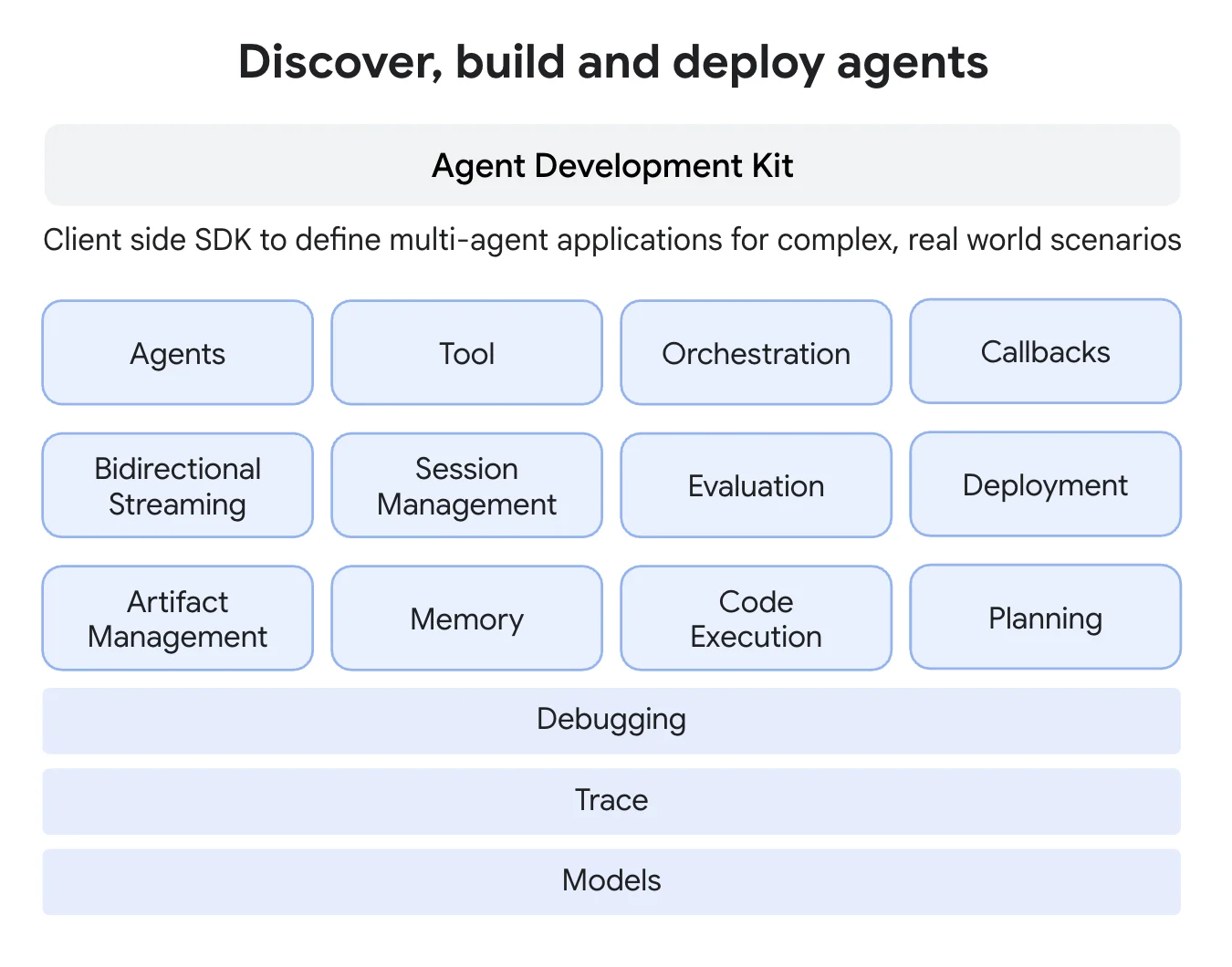
Source: Google
1. Actual Memory with a Persistent State Engine
ADK introduces a robust Session concept. This is far more than just chat history. Each session has a dedicated state attribute, a serializable key-value store that serves as the agent’s “scratchpad” for the conversation.
- Reliable Updates: Instead of manually passing state back and forth, you modify it directly on a context object (callback_context.state[‘user_id’] = ‘12345’). The ADK framework automatically captures this state data.
- Built for Persistence: The SessionService is pluggable. You can start with an in-memory service for rapid prototyping, then seamlessly switch to a DatabaseSessionService to persist conversation state in Redis, MongoDB, or Postgres, ensuring no data is lost between sessions or application restarts.
2. MCP and Tools Architecture
An agent’s true power lies in its ability to act. This is where ADK’s tool-use architecture transforms conversational AI. It provides a robust, developer-friendly system for connecting your agent to any API, database, or custom function, turning intentions into actions.
- From Python Functions to Agent Actions: ADK makes tool creation incredibly intuitive. You can define a tool by simply writing a standard Python function and decorating it (e.g., with @tool). ADK automatically inspects the function’s signature, including type hints, to generate a schema that the LLM can understand. This means turning complex business logic, like get_order_status(order_id: str) -> dict, into a callable agent tool is trivial, requiring no boilerplate code.
- Seamless Orchestration: Once defined, you provide the agent with a list of available tools. The ADK framework handles the complex orchestration behind the scenes. When a user’s request requires external data or action, the agent reasons about which tool to use, extracts the correct parameters, and executes it. The framework manages the entire loop, from the model’s decision to call a tool to its execution —and feeds the result back to the model for a final, informed response.
- Designed for the Enterprise Ecosystem: ADK is built to integrate, not isolate. It acts as the intelligent glue between your Large Language Models and your existing Model-Centric Platforms (MCPs), microservices, and APIs. Whether you need to query an internal customer database, trigger a workflow in a legacy system, or fetch data from a proprietary third-party API, ADK’s tool-centric design ensures your agent can be securely and reliably connected to the systems that run your business.
3. Guaranteed Structure with Schemas and Planners
This is ADK’s superpower. You don’t ask for structured data, you enforce it.
- Schema-Driven Output: When defining a core LLM Agent, you can provide an output_schema. This forces the agent’s final response to be a JSON string that strictly conforms to your predefined structure. This eliminates parsing errors, making the tool incredibly reliable. The agent’s output is no longer a suggestion; it’s a contract.
- Structured Reasoning with Planners: ADK includes Planners like PlanReActPlanner that compel the model to follow a specific thought process: create a Plan, execute an Action (e.g., calling a tool), and provide Reasoning. This structured thinking makes the agent’s behavior transparent, debuggable, and far more predictable than a black-box text response.
4. Grounding and Guardrails
ADK is built for enterprise governance. It provides a multi-layered system to ensure your agent is safe, accurate, and compliant.
- Eliminate Hallucinations with Grounding: ADK has built-in grounding tools for both Google Search and Vertex AI Search. You can configure an agent to base its answers only on real-time web results or, more importantly, on your company’s own private data indexed in Vertex AI Search. The agent is forced to cite its sources, moving from making things up to data-driven responses.
- Enforce Business Rules: ADK’s design allows for granular control. You can implement In-Tool Guardrails that embed defensive logic within the tools themselves (e.g., a database tool that can only query specific tables). Furthermore, you can use model and tool callbacks to validate every call an agent makes, before or after execution, to check parameters against business rules or user permissions stored in the session state.
- CallBack Pattern: ADK provides call-back functionality that can be used for grounding and guardrails, so no sensitive information is passed to LLMs, nor is any sensitive non-grounded response sent back from the agent. The level of sophistication is limited only by imagination.
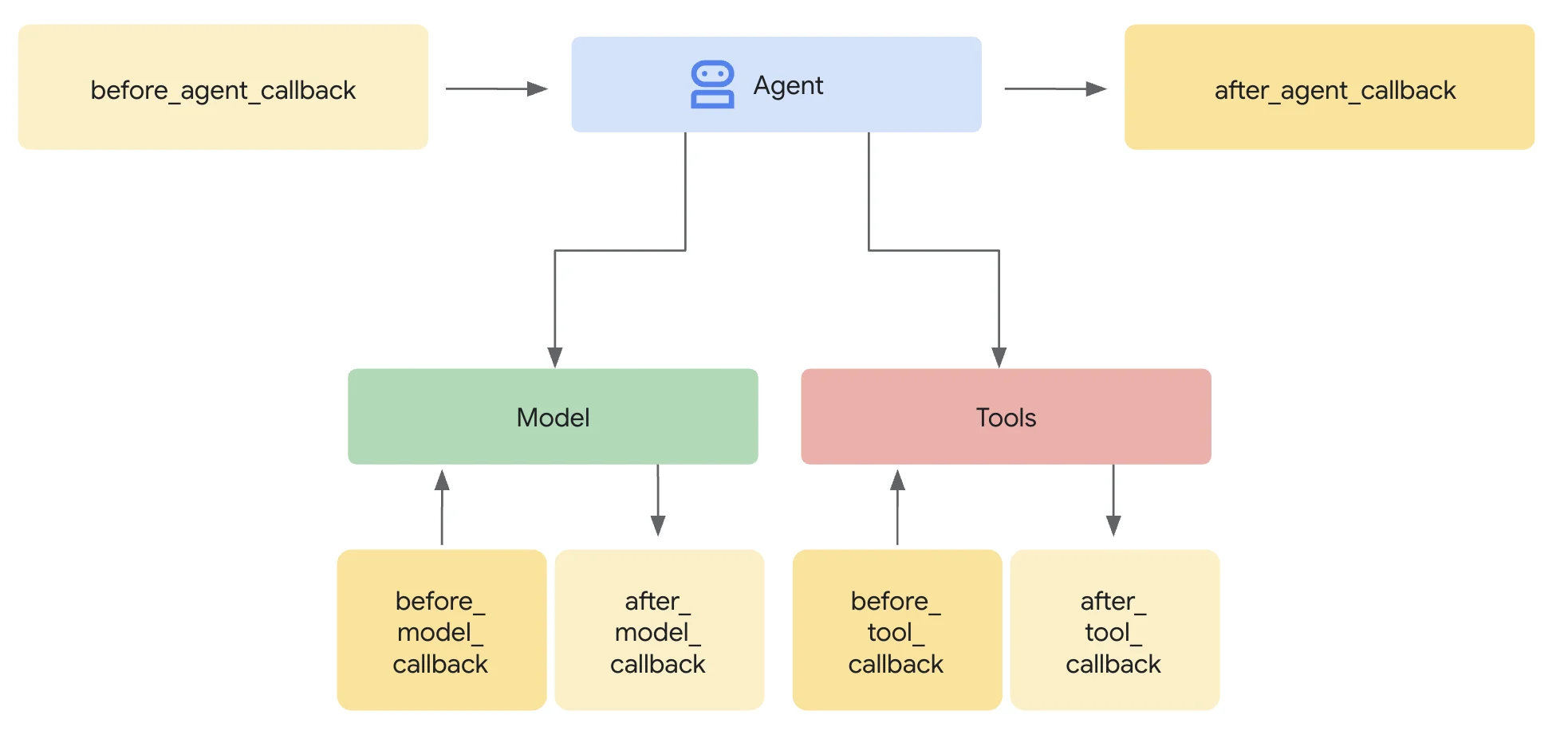
Source: Google
Build an Agent with the Google Agent Development Kit
Google ADK agentic framework provides the foundation for building intelligent AI agents that can autonomously interact with tools, APIs, and workflows. It enables developers to design systems where agents can make decisions, execute tasks, and integrate with external services in real time. By leveraging this framework, businesses can create scalable and adaptive AI-driven automation solutions. This makes Google ADK a powerful choice for developing next-generation AI agents.
Get Started with Single Agent
Building a single agent is the starting point in Google ADK agentic framework. You can design it to perform specific tasks using pre-built models and tools. ADK offers complete flexibility in the way you interact with the agents, like CLI, Web UI, API Server, and API (Python).
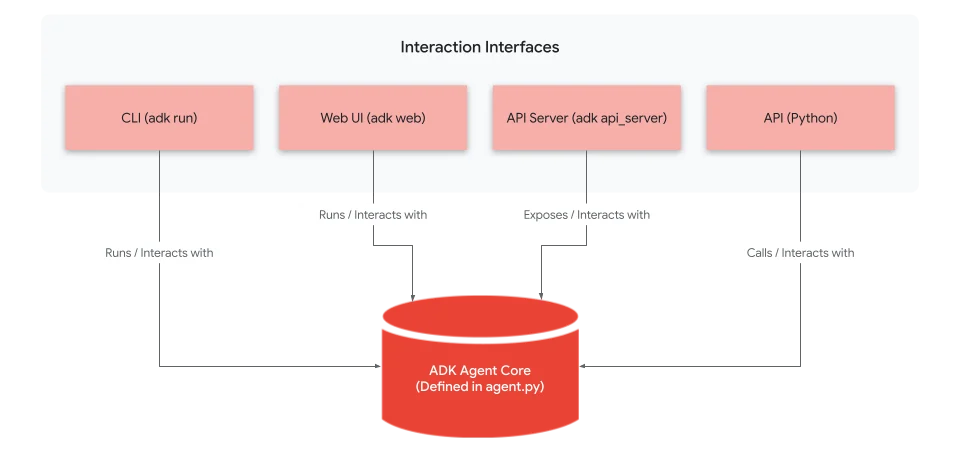
Source : Google
Steps to Build a Single Agent in Google ADK AI Agentic Framework:
- Set Up Environment – Install Google ADK and required dependencies in your development setup.
- Define the Model – Choose the LLM (e.g., Gemini) that powers your agent.
- Add Tools – Attach tools like search, API calls, or database queries that the agent can use.
- Set Instructions – Provide clear instructions or behavior rules for how the agent should respond.
- Run & Test – Deploy the agent locally, test interactions, and refine its outputs.
| Success Story: How Testing Automation AI Agent Helped a Leading Bank Reduce QA Effort and Boost Accuracy? |
Building Multi-Agent Applications with ADK
When it comes to building a multi-agent with Google Agentic AI framework, it outshines the other frameworks with its pre-built tools. A multi-agent system allows you to scale beyond a single agent by orchestrating multiple dedicated agents. One root agent can delegate tasks to sub-agents based on user input.
Steps to Build a Multi-Agent System in ADK:
- Create Specialized Agents – Define individual agents for tasks (e.g., GreetingAgent, WeatherAgent, FarewellAgent).
- Define Roles & Descriptions – Assign a domain or role to each agent so the system knows which one to use.
- Set Up the Root Agent – Create a root (or coordinator) agent that decides which sub-agent should handle a request.
Enable Delegation – Configure the delegation logic so the root agent passes queries to the right specialized agent. - Test Collaboration – Run multi-agent workflows to ensure agents collaborate smoothly and produce predictable results.
Benefits of Google Agent Development Kit
Google ADK AI Agent framework is designed to simplify the journey of creating multiple agent applications. It not only offers powerful orchestration and deep Google Cloud integration but also addresses the everyday challenges of building agents, such as scalability, memory retention, and governance. Here is why you must try the Agent Development Kit:
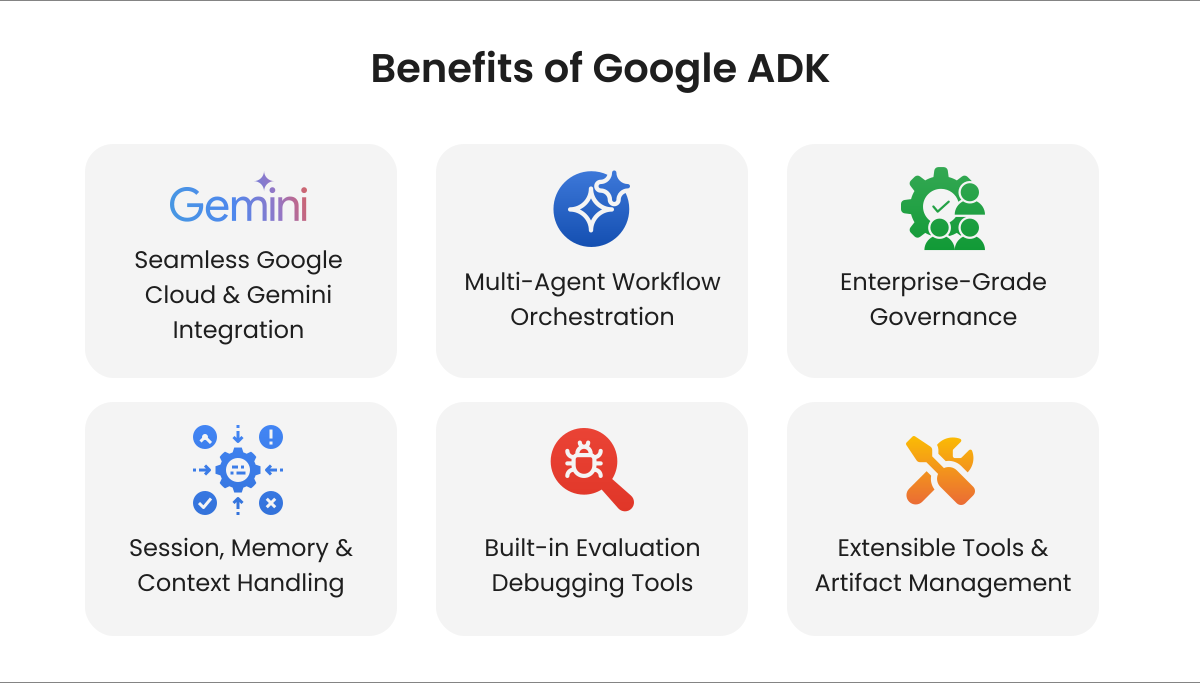
- Seamless Google Cloud & Gemini Integration: When you use other GCP services, working natively with Vertex and Gemini reduces friction for quick, secure deployment. It also addresses the challenges of moving prototypes into production.
- Multi-Agent Workflow Orchestration: Eliminates the need for custom orchestration logic by providing built-in agents such as Sequential, Parallel, and Loop, managing the complexity of coordinating multi-step agent workflows.
- Enterprise-Grade Governance: Let developers build safe and reliable agents with compliance tools, guardrails, and monitoring.
- Session, Memory & Context Handling: The Google Agent Development Kit provides both session-level state and long-term memory, helping agents retain user context across interactions.
- Built-in Evaluation & Debugging Tools: Measure performance and debug complex agent behaviors using ADK’s built-in tools for testing, monitoring, and evaluation.
- Extensible Tools & Artifact Management: Simplify agent connectivity to real-world tasks by leveraging pre-built tools (Search, Code Exec) and MCP tools, and by integrating 3rd-party libraries, enabling seamless integration with APIs, databases, and services.
How NeosAlpha Helps You Build Successful AI Agents with Google ADK Agentic Framework?
NeosAlpha leverages the power of the Google ADK agentic framework to design and deploy intelligent AI agents tailored to business needs. With over 8+ years of experience in integration and automation, we have built real-world solutions like testing and marketing automation agents that drive efficiency and scale.
- 8+ years of experience delivering enterprise-grade automation and integration solutions
- Build tailored agents such as marketing automation agents and testing agents
- Connect AI agents with CRMs, APIs, cloud platforms, and enterprise tools
- Design systems where multiple agents collaborate for complex workflows
- From strategy and development to deployment and optimization
Conclusion
The era of simple chatbots is over. The future belongs to sophisticated, integrated Google AI agents that can securely participate in and execute your business processes. The “prompt-in, response-out” model was a fascinating first step, but its limitations are now apparent.
With Google ADK, organizations get a purpose-built framework for building intelligent, safe, and scalable AI agents. By combining workflow orchestration, persistent memory, structured outputs, and enterprise guardrails, ADK enables businesses to move beyond prototypes and deliver real-world value.
For enterprises already invested in the Google Cloud ecosystem, ADK is not just a framework; it’s a strategic advantage that bridges the gap between AI innovation and business execution. The time to evolve from chatbots to intelligent agents is now, and Google ADK makes that transformation possible. As a certified Google Apigee Partner and Google App Development Specialist, NeosAlpha can help you leverage the full potential of Google ADK.
Frequently Asked Questions
1. What is Google Agentic AI Framework?
Google Agentic AI Framework refers to a set of tools and frameworks, including Google ADK, designed to build autonomous AI agents that can make decisions, interact with external systems, and execute tasks. It enables developers to create intelligent workflows by combining AI models with APIs, tools, and real-world data sources.
2. How to use the Google Agent Development Kit?
To use Google ADK, developers can first set up the environment, define agents with instructions and models, and then compose workflows using sequential or parallel structures. After testing and evaluating the agents using built-in tools, deploy agents locally or on Google Cloud services.
3. What are the different types of ADK?
Google Agent Development Kit supports various agent types, including LLM Agents for reasoning and tool use, Workflow Agents such as Parallel and Loop Agents for task orchestration, and Custom Agents that enable developers to extend the framework with specialized logic tailored to their business use case.
4. Which is better, LangChain vs Google ADK?
LagChain is an open-source orchestration framework for building applications with LLM. Google ADK is an open-source toolkit that helps developers build sophisticated AI agents. While both serve similar purposes, ADK offers stronger integration with Google Cloud, making it ideal for GCP users; on the other hand, LangChain is designed to provide broader integrations, making it suitable for prototyping and diverse model use.
5. How to authenticate LangChain or Google ADK agents with third-party tools?
LangChain or Google ADK agents can be authenticated using API keys, OAuth tokens, or service accounts to securely access third-party tools and APIs. These credentials are typically configured within the agent’s tool settings and passed in request headers during execution. To authenticate Google ADK or LangChain with third-party tools, connect with us.